DevOps Engineering
Master modern DevOps practices and build in-demand skills across automation, cloud engineering, and secure software delivery.

Duration
Approx 12 weeks3 hrs per week

Build industry-ready DevOps skills for modern software development careers
DevOps skills are essential for organisations looking to build, deliver, and manage software faster, more reliably, and at scale. On this ExpertTrack, you’ll develop practical experience across the DevOps lifecycle – from version control and automation to cloud-native technologies, security, and AI-driven operations.
Through hands-on exercises and real-world scenarios, you’ll build the technical skills needed to work with modern software development practices and prepare for roles in DevOps, cloud engineering, platform engineering, and software development.
Whether you’re starting your DevOps journey or looking to expand your existing technical skills, this ExpertTrack will help you understand the tools, processes, and practices shaping today’s technology teams.
Master DevOps fundamentals and version control with Git
Strong DevOps practices begin with effective collaboration, automation, and software development workflows. You’ll start by building a foundation in DevOps principles, the Software Development Lifecycle (SDLC), Agile practices, and collaborative development.
You’ll gain practical experience using Git, the industry-standard version control system, to manage source code and support team-based software development.
Automate software delivery with CI/CD and Infrastructure as Code
Modern software teams rely on automation to deliver applications quickly and consistently. You’ll learn how to automate software delivery workflows and manage infrastructure using industry-relevant DevOps practices.
You’ll develop practical skills in building CI/CD pipelines, automating infrastructure tasks, and using Infrastructure as Code. By learning how to reduce manual processes and create repeatable deployment workflows, you’ll gain valuable automation skills that support scalable cloud environments and modern software delivery.
Deploy and manage cloud-native applications with containers
Container technologies have transformed how organisations build and operate modern applications. You’ll learn how to deploy, manage, and monitor containerised applications using technologies used by today’s DevOps teams.
You’ll gain hands-on experience with Docker and Kubernetes, exploring how containers simplify application deployment and how orchestration enables reliable, scalable systems. You’ll also develop monitoring and observability skills using tools such as Prometheus and Grafana.
Secure DevOps workflows with DevSecOps and AI automation
As software delivery becomes increasingly automated, security must be integrated throughout the development process. You’ll learn how to build secure, resilient software delivery pipelines.
You’ll explore DevSecOps principles, secure CI/CD practices, infrastructure security, and approaches for protecting modern applications and cloud environments. You’ll also discover how AI and AIOps can improve automation, security monitoring, and operational decision-making.
By combining security, automation, and AI-driven insights, you’ll develop advanced skills for emerging DevOps, cloud engineering, and platform engineering roles.
Develop the skills to succeed in modern DevOps roles
Through this ExpertTrack, you’ll build practical skills with the tools and practices used by modern engineering teams, gaining the confidence to contribute to software delivery, infrastructure management, and secure cloud environments.
By the end, you’ll have the knowledge needed to work in today’s fast-moving software industry.
Key skills you will learn
- Software Development Lifecycle
- DevOps Engineering
- Version Control with Git
- CI/CD Pipelines
- Infrastructure as Code
- Configuration Management
- Monitoring and Observability
- DevSecOps
- AI-driven DevOps
- Containerization
- Orchestration
Experience required
No prior DevOps experience is needed, though basic programming knowledge is helpful. You’ll build a strong foundation in Git, version control, and software delivery practices.
Learners need a computer (Windows, macOS, or Linux) with at least 8 GB RAM and a stable internet connection. Python 3.10 or later should be installed, along with a code editor such as VS Code. No paid software or specialised hardware is required.
Getting started
This ExpertTrack is designed for students, tech enthusiasts, developers, and IT professionals who want to learn modern software development and DevOps fundamentals.
ExpertTrack course overview
Course 1


DevOps Essentials and Version Control with Git
Build in-demand DevOps and version control skills through exercises that prepare you for real-world software development.
3 tests
3 weeks
3 hours per week
Week 1
Build Your DevOps Foundation
- Explore SDLC and DevOps Culture
- Map the DevOps Lifecycle
Week 2
Navigate DevOps Adoption and Pipeline Stages
- Move from DevOps Concepts to Adoption
- Learn Core DevOps Pipeline Stages
- Connect Configuration, Monitoring and Delivery
Week 3
Apply Git and Version Control Practices
- Build a Foundation in Version Control and Git
- Configure and Manage Git Repositories
- Apply Branching, Merging, and GitHub Actions
Course 2

CI/CD, Configuration Management, and Infrastructure as Code
Gain hands-on DevOps automation experience to streamline software delivery and build sought-after cloud engineering skills.
3 tests
3 weeks
3 hours per week
Week 1
Build and Manage Continuous Integration Pipelines with Jenkins
- Build a Foundation in Continuous Integration and Jenkins
- Explore Jenkins Architecture and Configure Jenkins Pipelines
- Secure, Administer, and Monitor Jenkins
Week 2
Automate Configuration and Build Processes
- Build a Foundation in Configuration Management and Ansible
- Automate Infrastructure Tasks with Ansible Playbooks
- Automate Builds with Maven and Gradle
Week 3
Automate and Manage Infrastructure with Terraform and AWS CloudFormation
- Automate Infrastructure with Terraform
- Create and Configure AWS CloudFormation Stacks
- Manage CloudFormation Changes and Infrastructure Drift
Course 3

Containerization, Orchestration, and Monitoring
Build practical containerization skills to prepare for careers in DevOps, cloud, and platform engineering.
3 tests
3 weeks
3 hours per week
Week 1
Build and Manage Containerized Applications with Docker
- Build a Foundation in Containerization and Docker
- Manage Docker Containers, Images, and Storage
- Orchestrate and Secure Docker Applications
Week 2
Deploy and Manage Applications with Kubernetes
- Build a Foundation in Kubernetes
- Deploy and Connect Kubernetes Workloads
- Scale and Update Kubernetes Applications
Week 3
Monitor Applications and Centralise Logs
- Build a Foundation in Continuous Monitoring and Prometheus
- Configure Prometheus for Metrics Collection
- Visualise Metrics and Centralise Application Logs
Course 4

DevSecOps and AI-Driven DevOps Automation
Learn to integrate security, automation, and AI into software delivery to help you excel in DevSecOps and cloud engineering roles.
3 tests
3 weeks
3 hours per week
Week 1
Build DevSecOps and Secure Development Foundations
- Build a Foundation in DevSecOps
- Explore Shift-Left Security and Security as Code
- Integrate Security Controls into CI/CD
Week 2
Assess and Protect Applications, Infrastructure, and Containers
- Examine Application Security and Vulnerability Risks
- Assess Open-Source and Application Dependencies
- Secure Infrastructure and Container Workloads
Week 3
Apply AI to DevOps Automation and Operations
- Build a Foundation in AI-Assisted DevOps
- Apply AI to Code Analysis and Monitoring
- Automate Log Analysis and Incident Management
Prove you're job ready
Highlight the new, job-relevant skills you’ve gained and supplement existing qualifications with a hard-earned, industry-specific digital certificate – plus one for every course within your ExpertTrack.
- Learn the latest in your chosen industry or subject.
- Complete each course and pass assessments.
- Receive certificates validated by the educating organisation.
- Impress employers with learning outcomes you can add to your CV.
- Make your career dreams a reality.
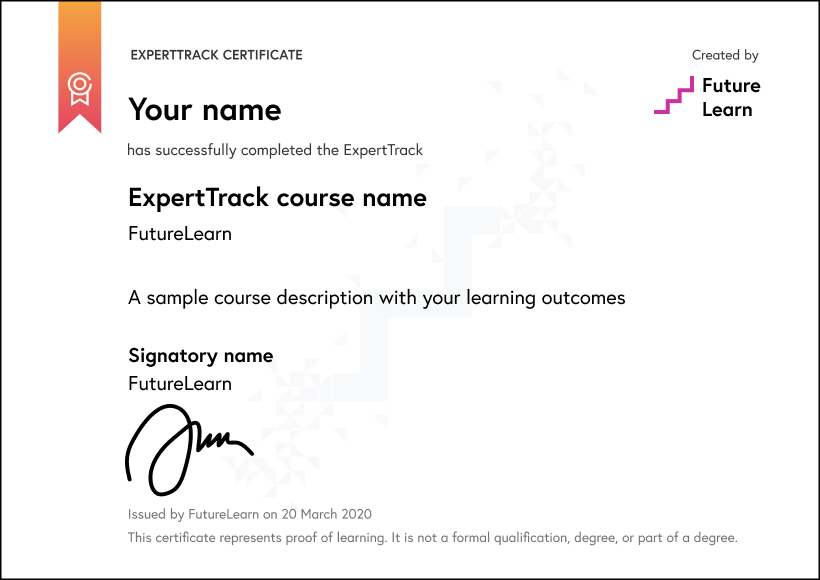
Download a PDF
How ExpertTracks work
Join an ExpertTrack to master new skills in your chosen specialist area. Work through a series of topic-focused courses at your own pace, and pass the final assessment to earn a digital certificate award which proves your expertise.
Decide if the ExpertTrack is right for you with free access to the full suite of courses and assessments for a week.
Pay a monthly subscription fee of $39 for as long as it takes you to complete the ExpertTrack. You can learn at your own pace and cancel at any time.
Receive a certificate for every completed course and pass the final assessment to earn a digital certificate.
Use your specialist training to progress further in your career or build expertise in areas you’re passionate about.
World-class learning with Edureka
Edureka is a global online learning platform offering industry-focused training in emerging technologies such as Cloud, AI, GenAI, Data Science, DevOps, and Cybersecurity, helping professionals upskill and advance their careers.
Meet your instructor

Learning on FutureLearn
Your learning, your rules
- Courses are split into weeks, activities, and steps to help you keep track of your learning
- Learn through a mix of bite-sized videos, long- and short-form articles, audio, and practical activities
- Stay motivated by using the Progress page to keep track of your step completion and assessment scores
Join a global classroom
- Experience the power of social learning, and get inspired by an international network of learners
- Share ideas with your peers and course educators on every step of the course
- Join the conversation by reading, @ing, liking, bookmarking, and replying to comments from others
Map your progress
- As you work through the course, use notifications and the Progress page to guide your learning
- Whenever you’re ready, mark each step as complete, you’re in control
- Complete 90% of course steps and all of the assessments to earn your certificate
Want to know more about learning on FutureLearn? Using FutureLearn
What are our learners saying?
Add a new skill or forge a new path
"I recommend Futurelearn to anyone looking to learn and upskill...If you are in the job market, you might want to add a new skill or forge a new path."
They bring the classroom right to you
"FutureLearn courses are always interesting and informative. They bring the classroom right to you and send you on a journey to explore new ideas and offer interesting topics."
Start learning today - free 2-day trial
After your free trial you can:
- Pay $39 per month to keep learning online
- Have complete control over your subscription; you can cancel any time
- Work at your own pace and set your own deadlines at every stage
- Only pay while you’re learning; the subscription will cancel automatically when you finish
- Complete online assessments to test your knowledge and prove your skills
- Earn digital course certificates and a final award that you can share online, with potential employers, and your professional network
- Keep access to the content of courses you complete even after your subscription ends
FAQ
ExpertTracks are a series of online courses designed to help you master new skills in specialist areas. You pay a monthly subscription fee which includes access to all courses within the ExpertTrack, as well as assessments and the final digital certificate.
Each ExpertTrack comes with a 2-day free trial period. You may cancel your subscription at any time and your subscription will automatically cancel when you finish the courses and assessments in your chosen ExpertTrack.
Yes. All of our ExpertTracks come with a 2-day free trial. You may claim one free trial period per ExpertTrack.
You have two days before you will be charged your first monthly subscription fee. When you join an ExpertTrack you automatically receive a 2-day free trial period. You can cancel at any time during the trial period and no payment will be taken from your account.
Please see our full refund policy here.
No, all of our ExpertTracks consist of fully online courses. This means you can take an ExpertTrack from anywhere in the world.
No. ExpertTracks are designed for you to master new skills in a specialist area. You will earn a digital certificate that proves your learning, but it does not carry accreditation.
If you’re looking for certified or accredited courses, many of our microcredentials offer university credit or professional certification.
Have more questions about ExpertTracks? Read the ExpertTracks FAQs, or contact us.