
Course structure
In the next few weeks, we will introduce you to some of the most important remote sensing techniques used in archaeology. Each week will consist of a combination of theory on key topics, and practical instruction on how to do remote sensing for yourself. At the end of the course there will also be opportunities for you to show us what you have learnt by sharing your work with us and your coursemates!
In the rest of Week 1, we will give you a general introduction to remote sensing in archaeology, followed by a very brief introduction to geographic information systems (GIS) and QGIS – the GIS software we will be using throughout the course.
Week 2 covers the basics of satellite imagery, including the general principles of how it is captured and produced, and ‘natural colour’ imagery. We will also introduce you to Sentinel-2, which provides regularly updated medium-resolution satellite imagery, showing you where you can download and how you can begin to use it in QGIS.
 In Week 2 we will cover “natural colour” satellite imagery. Courtesy of ESA.
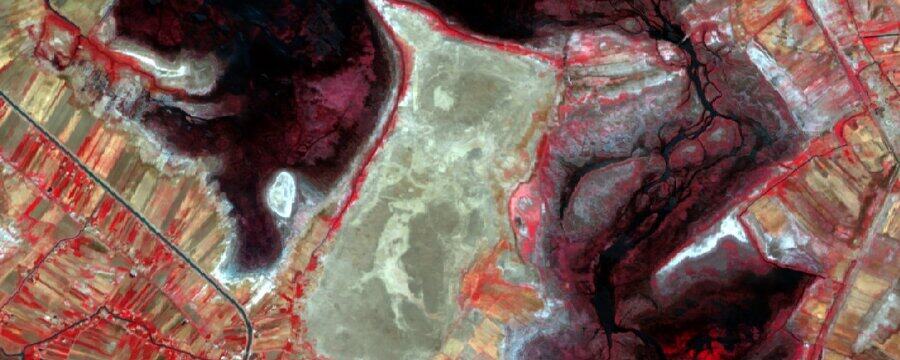
Week 3 moves beyond visible light imaging, introducing other parts of the electromagnetic spectrum and exploring how we can make use of non-visible wavelengths of light and multispectral satellite imagery. You will learn how to access the Landsat archive, which holds multispectral imagery going back several decades. We will cover different spectral band combinations and creating false-colour composites in QGIS using Landsat 8 imagery. Multispectral indices, helpful for visualising areas of vegetation and water, will also be introduced.
 In Week 3 we will cover multispectral satellite imagery. Courtesy of ESA.
In Week 4 we will introduce radar satellite data collection and digital elevation models (topographical models of the landscape). We will show you where you can download global digital elevation data, and how to use it in QGIS. Some basic topographical analyses will also be covered, demonstrating the basics of what can be done with this data.
 Week 4 will cover radar and digital elevation data. Data courtesy of the USGS.
Week 5 will centre around historical data. Corona, and other declassified space photography, will be introduced, including where it can be downloaded and how it can be used. We will also discuss historical maps and their use in archaeology, showing you where they can be found, and how to use them in QGIS.
 Week 5 will cover historical imagery and maps. Courtesy of the USGS.
Finally in Week 6 we will show you how to put all this knowledge to good use! We will demonstrate the workflow for gathering and using remote sensing data, with a case study from Iraq, and teach you how to create great maps. Lastly, we will introduce the final task of the course – creating a piece of work to share using some of the things you have learnt in your own area of interest.
 Week 6 will cover mapmaking. Data courtesy of the USGS.
Let us know which topic you’re most excited for in the comments!
To get the most out of this course you will need a device that can run the full version of QGIS – this means a Windows or Linux desktop PC or laptop, or an Apple iMac or Macbook. If you are accessing the course via a phone, tablet or Chromebook you will still be able to learn the theory, but unfortunately you will not be able to complete the practical components of the course.
Advanced Archaeological Remote Sensing: Site Prospection, Landscape Archaeology and Heritage Protection in the Middle East and North Africa

Advanced Archaeological Remote Sensing: Site Prospection, Landscape Archaeology and Heritage Protection in the Middle East and North Africa





